When I first started working with technology and computers it seemed that the operating systems and circuitry of the electronics were somewhat mysterious and the keys were held by arcane programmers and wizards at very closed-door corporate engineering departments.
In recent times I can think of more than a couple of instances where there were issues with the software or hardware of a manufacturer and the explanations or decoding of the problem and even suggestions as to how to remedy the problems came from the user base. I suppose this used to happen with letters to engineers that likely went unanswered and one never knew if anything came of them but the times are changing.
For example, it made national news on New Year's Eve 2008 when Microsoft's Zune (30 GB) suddenly started crashing; not just a handful but nearly every device; it seemed to be the Y2K that those of us in IT planned for but never happened was happening to the Zunes. There's a certain openness now, possibly because of a more sophisticated user base or because companies are more open about disclosing issues. David Murphy of PC World went over the root of the issue with the Zune recently and it's explained in such a way that non-programmers can readily understand it.
Thursday, April 26, 2012


Avoid the Recession Effect
Avoid the Recession Effect
By William Arruda and Kirsten Dixson
Everyone’s talking about it. And companies are preparing for it. Recession. It’s clear that there is some kind of economic down–turn on the horizon. Nothing makes a recession happen like corporate belt–tightening in anticipation of a recession. Now’s the time to prepare yourself so that you remain in control of your career. Here’s what you need to do to recession–proof your career:
Bolster Your Brand. During a challenging economic period, highly differentiated branding becomes even more important. To survive and thrive, your company needs innovation – which comes from creativity – which derives from a diverse workforce of individuals who are maximizing their unique strengths. So, building your brand will help you give your company what it needs. All while making you an indispensable resource. Personal branding is the most effective way to clarify and communicate what makes you different, special and valuable. It allows you to stand out from your peers. Unclear about your brand? Use this tool.
Build Bridges. Reach out to former colleagues. Strengthen relationships with customers and business partners. Take a former boss to lunch. Do what you need to get those bridges in working order, should you have to cross them. Schedule time with yourself to work on building and cultivating your network each day. Are you a power networker? Find out by spending a minute on this quiz.
Grow Your Google Quotient. If you do find yourself looking for work, you want to make sure you can be found online. A Google search is as standard as a reference check in a job search. If your online identity doesn’t impress recruiters or hiring managers, you will be eliminated from the short–list. Online identities are not built overnight, so investing now will reap rewards should the recession ax come down on you. To start, get a handle on the power of your current online ID with this complimentary tool.
Walk to the Water Cooler. If those around you don’t know who you are or what you do, management will think they don’t need you when it is time to start preparing the layoff list. You must consistently make others aware of the value that you are bringing to your organization or project. The value of networking with your colleagues, employees and professional neighbors should not be underestimated. So get out of your office, connect with those around you, and be attuned to opportunities and trends within your company and externally.
Get Active. Professional associations provide the greatest opportunity to demonstrate your value outside the company. Should you find yourself looking for a new job; the connections you make at your local AMA or Society of Professional Consultants chapter will help accelerate your transition into a new role. Remember, it’s more valuable to belong to fewer organizations and take leadership roles that enable you to get to know the entire membership.
Create Career Karma. Now’s not the time for a ‘me me me’ attitude (as if there is ever a time for centering solely on the self). Helping others recession–proof their careers is one of the greatest karma–building actions you can take. Remember, what goes around comes around. If you build great karma now, goodness will come back to you at some point when you truly need it. To get a daily dose of karma building advice, register here.
Start Counting. Measure the value you bring to your employer. Whether it is increased revenue, reduced cost, improved efficiency, increased sales leads, or reduced attrition, find a way to quantify your contribution to your organization and to the company overall. And be sure your manager is abundantly aware of this.
Re–do Your Resume. The time to get your resume, bio, and cover letters in order is at least six months before you hear you have been put on the layoff list. And to make sure yours stands out from the stack of others touting similar credentials and experience, hire a qualified, professional resume writer. They are well worth your investment.
Call In a Career Coach. Every great athlete has a coach; you should too. From helping you excel in your current position to enabling you to find the ideal job elsewhere, career coaches are critical to turning a good career into a stellar one. Invest in a career coach now versus later.
Reconnect with Recruiters. You don’t have to be actively job searching to be in touch with an executive recruiter. Remind recruiters with whom you’ve worked, who you are and what you have to offer. Also, seek their advice on what is happening in your particular field or job function. They have their fingers on the industry’s pulse and can give you a perspective you can’t find anywhere else.
Remember, it is those who are prepared for the recession who will sail right through. Others will have to endure the choppy waters. So get your ship in shape now and make a concerted effort to ensure your desired outcome. Just reading the tips in this article isn’t going to make them happen. So, take some time now to add these items to your to–do list so you’ll be in the best possible position should the looming recession impact your job.
Join William Arruda and Kirsten Dixson for an exclusive, complimentary TheLadders.com Webinar on Thursday, April 17th from Noon to 1 pm EST.
Virtual Visibility: Ten Steps to an Online Brand that Will WOW Recruiters
In this one–hour webinar, William Arruda and Kirsten Dixson – partners in Reach Personal Branding, authors of the bestselling book, “Career Distinction: Stand Out by Building Your Brand”, and leading authorities on Online Identity – show you exactly what you need to do to build and maintain a stellar online profile. They share with you the secrets of virtual visibility that will take you from online obscurity to a visible, valuable brand. If you want to attract the attention of executive recruiters and hiring managers, don’t miss this event. Space is limited. Reserve your seat now.
By William Arruda and Kirsten Dixson
Everyone’s talking about it. And companies are preparing for it. Recession. It’s clear that there is some kind of economic down–turn on the horizon. Nothing makes a recession happen like corporate belt–tightening in anticipation of a recession. Now’s the time to prepare yourself so that you remain in control of your career. Here’s what you need to do to recession–proof your career:
Bolster Your Brand. During a challenging economic period, highly differentiated branding becomes even more important. To survive and thrive, your company needs innovation – which comes from creativity – which derives from a diverse workforce of individuals who are maximizing their unique strengths. So, building your brand will help you give your company what it needs. All while making you an indispensable resource. Personal branding is the most effective way to clarify and communicate what makes you different, special and valuable. It allows you to stand out from your peers. Unclear about your brand? Use this tool.
Build Bridges. Reach out to former colleagues. Strengthen relationships with customers and business partners. Take a former boss to lunch. Do what you need to get those bridges in working order, should you have to cross them. Schedule time with yourself to work on building and cultivating your network each day. Are you a power networker? Find out by spending a minute on this quiz.
Grow Your Google Quotient. If you do find yourself looking for work, you want to make sure you can be found online. A Google search is as standard as a reference check in a job search. If your online identity doesn’t impress recruiters or hiring managers, you will be eliminated from the short–list. Online identities are not built overnight, so investing now will reap rewards should the recession ax come down on you. To start, get a handle on the power of your current online ID with this complimentary tool.
Walk to the Water Cooler. If those around you don’t know who you are or what you do, management will think they don’t need you when it is time to start preparing the layoff list. You must consistently make others aware of the value that you are bringing to your organization or project. The value of networking with your colleagues, employees and professional neighbors should not be underestimated. So get out of your office, connect with those around you, and be attuned to opportunities and trends within your company and externally.
Get Active. Professional associations provide the greatest opportunity to demonstrate your value outside the company. Should you find yourself looking for a new job; the connections you make at your local AMA or Society of Professional Consultants chapter will help accelerate your transition into a new role. Remember, it’s more valuable to belong to fewer organizations and take leadership roles that enable you to get to know the entire membership.
Create Career Karma. Now’s not the time for a ‘me me me’ attitude (as if there is ever a time for centering solely on the self). Helping others recession–proof their careers is one of the greatest karma–building actions you can take. Remember, what goes around comes around. If you build great karma now, goodness will come back to you at some point when you truly need it. To get a daily dose of karma building advice, register here.
Start Counting. Measure the value you bring to your employer. Whether it is increased revenue, reduced cost, improved efficiency, increased sales leads, or reduced attrition, find a way to quantify your contribution to your organization and to the company overall. And be sure your manager is abundantly aware of this.
Re–do Your Resume. The time to get your resume, bio, and cover letters in order is at least six months before you hear you have been put on the layoff list. And to make sure yours stands out from the stack of others touting similar credentials and experience, hire a qualified, professional resume writer. They are well worth your investment.
Call In a Career Coach. Every great athlete has a coach; you should too. From helping you excel in your current position to enabling you to find the ideal job elsewhere, career coaches are critical to turning a good career into a stellar one. Invest in a career coach now versus later.
Reconnect with Recruiters. You don’t have to be actively job searching to be in touch with an executive recruiter. Remind recruiters with whom you’ve worked, who you are and what you have to offer. Also, seek their advice on what is happening in your particular field or job function. They have their fingers on the industry’s pulse and can give you a perspective you can’t find anywhere else.
Remember, it is those who are prepared for the recession who will sail right through. Others will have to endure the choppy waters. So get your ship in shape now and make a concerted effort to ensure your desired outcome. Just reading the tips in this article isn’t going to make them happen. So, take some time now to add these items to your to–do list so you’ll be in the best possible position should the looming recession impact your job.
Join William Arruda and Kirsten Dixson for an exclusive, complimentary TheLadders.com Webinar on Thursday, April 17th from Noon to 1 pm EST.
Virtual Visibility: Ten Steps to an Online Brand that Will WOW Recruiters
In this one–hour webinar, William Arruda and Kirsten Dixson – partners in Reach Personal Branding, authors of the bestselling book, “Career Distinction: Stand Out by Building Your Brand”, and leading authorities on Online Identity – show you exactly what you need to do to build and maintain a stellar online profile. They share with you the secrets of virtual visibility that will take you from online obscurity to a visible, valuable brand. If you want to attract the attention of executive recruiters and hiring managers, don’t miss this event. Space is limited. Reserve your seat now.
7 Undeniable Reasons Why Some People Fail Where Others Succeed
7 Undeniable Reasons Why Some People Fail Where Others Succeed: "

To most people, being born in a free country is the greatest gift. To others, it’s a fleeting thought. For the latter, I feel sorry.
Before I go any further, I must admit that not everyone will find success. There will always be those who sit around waiting for success to find them. There will be those who are simply not willing to achieve it. And then there’s the fact that success would not exist without failure. All of these things create what we know; a world where success and failure are experienced by different groups of people.
Everyone in a free country has the opportunity to succeed. So why doesn’t everyone succeed? Because success and failure are choices made consciously and subconsciously and failure is chosen by many for various reasons.
Here are 7 undeniable reasons why some people fail where others succeed:
Do you believe that success is won, innate, or earned? The answer someone gives can tell you a lot about them, and why they are where they are.
Success is won: if you believe that success is won, you experience animosity and envy toward those you view as lucky or more fortunate than you. You also believe that success is out of your control; it simply depends on a flip of the coin or certain circumstances.
How hard are you willing to work if you believe that success is won rather than earned?
Success is innate: people who believe success is innate often feel the same as those who believe it’s won. The only difference is that believers in innate-success have a more pessimistic view of opportunity; it’s trivial to them (we’ll go over this a little later). Why does opportunity matter if success is innate?
How hard are you willing to work if you feel your opportunity doesn’t matter and your chances of success are nil because of your circumstances?
Success is earned: the last group of people believes what we know to be true based on statistical analysis; success is earned. These people understand that in order to succeed, they must earn it. How do they earn it? They climb the mountain and utilize the same process others have used to achieve.
How hard are you willing to work if you believe success must be earned?
Do you believe that opportunity provides a possibility of success, a probability of success, or that it’s trivial?
Let’s ask the same questions we asked when we discussed success:
I hope this is coming together for you. I still want to go further though. I want you to see exactly how your views on opportunity and success work together to help determine your outcome.
In layman’s terms, the rich see success as earned and view their opportunity as probability. The middle class see success as earned and view their opportunity as possibility, but sometimes as probability. The poor class sees success as won or innate and views their opportunity as trivial, or in some cases as a possibility, but not a probability.
Of course, people don’t stay in one class their entire life. The people who move between classes tend to have the same outlook as those of the class they move to.
We just discussed two important terms: success and opportunity. In order to continue our discussion further, we must discuss another, ‘work.’
‘But success doesn’t always come from hard work!’
Inevitably, people will point out that factory employees work harder than CEOs. Of course, this depends on your analysis of the word ‘work.’
Choose a corresponding term:
Those who claim that success doesn’t always come from hard work only acknowledge one aspect of work, physical labor.
Of course, work is labor, period. Excluding mental labor from the term work is biased and unfair. CEOs may sit at a desk, wear a suit, and enjoy the air conditioning, but that doesn’t mean they labor any less than the man in the shop room, it’s simply a different type of labor. Not accepting this is like making the argument that one who hates their job labors more than one who enjoys their job and the pay should be altered to make up for it. You see where this is going?
In terms of pay scale, people who run companies are worth a lot more than those who assemble products. Why? Because it’s easy to find people who can assemble products and it’s not very easy to find people who can operate multi-million dollar companies for a profit.
Needless to say, the man in the shop room wouldn’t have a job if the CEO behind the desk wasn’t doing his (and vice versa). The only difference is which job you’d rather be doing, and that depends solely on the choices you make throughout your life.
How do you think the CEO views success and opportunity? How do you think the shop worker views those same terms?
While there is a minority of people who actually choose to fail, the majority that fail simply make poor choices or have a poor outlook. Basically, for the majority, failure is a choice but not a decision.
I can’t possibly list all of the bad choices people make which lead them to failure, but a few to get you headed in the right direction are:
And the list goes on, and on, and on…..and on.
Of course, there are also those things which are out of someone’s control.
If you’re born into an inner-city family and attend a poor school system, you obviously start out behind others. If you’re handicapped, your road to success may be longer and more difficult. But none of this bars you from success; I’ll elaborate on this later when we discuss circumstances.
Lastly, as our quote up top reminds us, many people defeat themselves simply by expecting defeat in the first place. They don’t expect success and it actually becomes a self-fulfilling prophecy. For more on this, you might like my highly popular article; Your Life Sucks Because You Expect it to Suck (and 10 Ways to Improve it Right Now).
‘But, hard work doesn’t always equal success. Some people work really hard, but fail. They tried and didn’t succeed.’
Failure is a key ingredient in success. Those who don’t achieve success most likely quit after their failure. Quitting, of course, is a choice.
If you were to follow in the footsteps of a successful person, you would likely pass the remnants of multiple failures. If you followed in the footsteps of a failure, you would find their lifeless future at the feet of their first opponent.
So the question is, how hard and for how long are you willing to fight? There are no shortcuts, statistically. The vast majority of millionaires are self-made and far too many lottery winners are broke and worse off than they were before they won the lottery. Why? Because wealth is about behavior and money doesn’t protect you from failure.
If you want to succeed where other people fail, you have to step right over failure and keep walking. The people who don’t make it let failure defeat them. Failure becomes their end result because they refuse to walk any further.
Look at it this way; if you aren’t dead yet, there’s still hope.
One of the biggest rebuttals given by non-achievers is that they are held back by their circumstances.
I don’t think circumstance is a fair argument though. Yes, you may be subject to circumstances that make it more difficult for you to succeed, but that doesn’t change the fact that you start with the same opportunity as others; the opportunity provided to you by living in a free country.
It’s also important to note that some people handle circumstances better than others. For instance, you can’t say that a handicap is a circumstance that prevents you from achieving when others with the same handicap have achieved.
Everyone has issues, circumstances, road blocks, etc. It’s all about how you deal with your circumstances and how hard you’re willing to work to overcome them. But the basics don’t change; you’re still in a free country and nobody is preventing you from achieving except for yourself.
Circumstance is also unimportant because it doesn’t determine finality. For example, a trust fund baby can lose his fortune with a series of bad decisions just as easily as a child from the ghetto can acquire a fortune with a series of good decisions.
Don’t be quick to judge others based on their circumstances. Instead, judge them based on their ferocity in overcoming those circumstances.
First, you are given an opportunity. Then, based on that opportunity, you hatch a dream. And when you try to execute that dream, you meet your opposition. It is here on the battleground, facing the opposition, that success is either realized or lost.
Everyone faces opposition on their way to the top. The crack babies and the trust fund babies both have their own sets of problems. And you can’t assume that one faces more opposition than the other; everyone’s life and path to success is unique.
The one thing they do have in common is the opportunity for success. But, as you try to succeed, there will be people and circumstances around every corner that try to tell you no. The disability you were born with tells you no, your abusive parents tell you no, your pessimistic friends tell you no, your lack of self esteem causes you to say no to yourself, addiction tells you no, and so on.
The people who succeed are those who don’t take no for an answer. They shrug off the pessimism, they choose better friends, they put up boundaries with their family, and they surround themselves with positive people and things.
Success is possible for anyone who is willing to achieve it. There are many who want success, but there is a huge difference between wanting-to and willing-to. You have to be willing…
The other thing to remember is that your outlook and the way you define success, opportunity, and work play a large role in determining your outcome.
If you aren’t achieving, the first person you should always look to first is yourself.
This was a guest post by Kevin Geary from Change Your Tree. Kevin is also the author of The Good Parent’s Guide to Teaching Your Children How to Retire Young and Wealthy.
Image by Thomas Hawk.


 "
"
(Via PickTheBrain.)
‘Success happens not by chance, but because you were given a chance and took advantage of it.’ - Kevin Geary
To most people, being born in a free country is the greatest gift. To others, it’s a fleeting thought. For the latter, I feel sorry.
Before I go any further, I must admit that not everyone will find success. There will always be those who sit around waiting for success to find them. There will be those who are simply not willing to achieve it. And then there’s the fact that success would not exist without failure. All of these things create what we know; a world where success and failure are experienced by different groups of people.
Everyone in a free country has the opportunity to succeed. So why doesn’t everyone succeed? Because success and failure are choices made consciously and subconsciously and failure is chosen by many for various reasons.
Here are 7 undeniable reasons why some people fail where others succeed:
1. They Define Success Wrong
‘Striving for success without hard work is like trying to harvest where you haven’t planted.’ - David Bly
Do you believe that success is won, innate, or earned? The answer someone gives can tell you a lot about them, and why they are where they are.
Success is won: if you believe that success is won, you experience animosity and envy toward those you view as lucky or more fortunate than you. You also believe that success is out of your control; it simply depends on a flip of the coin or certain circumstances.
How hard are you willing to work if you believe that success is won rather than earned?
Success is innate: people who believe success is innate often feel the same as those who believe it’s won. The only difference is that believers in innate-success have a more pessimistic view of opportunity; it’s trivial to them (we’ll go over this a little later). Why does opportunity matter if success is innate?
How hard are you willing to work if you feel your opportunity doesn’t matter and your chances of success are nil because of your circumstances?
Success is earned: the last group of people believes what we know to be true based on statistical analysis; success is earned. These people understand that in order to succeed, they must earn it. How do they earn it? They climb the mountain and utilize the same process others have used to achieve.
How hard are you willing to work if you believe success must be earned?
2. They Define Opportunity Wrong
‘The ladder of success is best climbed by stepping on the rungs of opportunity.’ - Ayn Rand
Do you believe that opportunity provides a possibility of success, a probability of success, or that it’s trivial?
Let’s ask the same questions we asked when we discussed success:
- How hard are you willing to work if you believe the opportunity you were born with is trivial?
- How hard are you willing to work if you believe the opportunity you were born with is a possibility?
- How hard are you willing to work if you believe the opportunity you were born with is a probability?
I hope this is coming together for you. I still want to go further though. I want you to see exactly how your views on opportunity and success work together to help determine your outcome.
- People who believe success is won see their opportunity as a possibility, but sometimes as trivial.
- People who believe success is innate see their opportunity as trivial.
- People who believe success is earned see their opportunity as a probability, but sometimes only as a possibility.
In layman’s terms, the rich see success as earned and view their opportunity as probability. The middle class see success as earned and view their opportunity as possibility, but sometimes as probability. The poor class sees success as won or innate and views their opportunity as trivial, or in some cases as a possibility, but not a probability.
Of course, people don’t stay in one class their entire life. The people who move between classes tend to have the same outlook as those of the class they move to.
3. They Define Work Wrong
‘The value of a man’s position is often determined by the number of people qualified to fill it.’ - Kevin Geary
We just discussed two important terms: success and opportunity. In order to continue our discussion further, we must discuss another, ‘work.’
‘But success doesn’t always come from hard work!’
Inevitably, people will point out that factory employees work harder than CEOs. Of course, this depends on your analysis of the word ‘work.’
Choose a corresponding term:
- Physical Labor
- Mental Labor
- Labor
Those who claim that success doesn’t always come from hard work only acknowledge one aspect of work, physical labor.
Of course, work is labor, period. Excluding mental labor from the term work is biased and unfair. CEOs may sit at a desk, wear a suit, and enjoy the air conditioning, but that doesn’t mean they labor any less than the man in the shop room, it’s simply a different type of labor. Not accepting this is like making the argument that one who hates their job labors more than one who enjoys their job and the pay should be altered to make up for it. You see where this is going?
In terms of pay scale, people who run companies are worth a lot more than those who assemble products. Why? Because it’s easy to find people who can assemble products and it’s not very easy to find people who can operate multi-million dollar companies for a profit.
Needless to say, the man in the shop room wouldn’t have a job if the CEO behind the desk wasn’t doing his (and vice versa). The only difference is which job you’d rather be doing, and that depends solely on the choices you make throughout your life.
How do you think the CEO views success and opportunity? How do you think the shop worker views those same terms?
4. They Defeat Themselves
‘To expect defeat is nine-tenths of defeat itself.’ - Henry Mencken
While there is a minority of people who actually choose to fail, the majority that fail simply make poor choices or have a poor outlook. Basically, for the majority, failure is a choice but not a decision.
I can’t possibly list all of the bad choices people make which lead them to failure, but a few to get you headed in the right direction are:
- Abusing drugs or alcohol / addiction.
- Not getting an education.
- Having a poor work ethic.
- Having a child too young or out of wedlock.
- Immaturity / laziness.
- Borrowing too much money.
And the list goes on, and on, and on…..and on.
Of course, there are also those things which are out of someone’s control.
If you’re born into an inner-city family and attend a poor school system, you obviously start out behind others. If you’re handicapped, your road to success may be longer and more difficult. But none of this bars you from success; I’ll elaborate on this later when we discuss circumstances.
Lastly, as our quote up top reminds us, many people defeat themselves simply by expecting defeat in the first place. They don’t expect success and it actually becomes a self-fulfilling prophecy. For more on this, you might like my highly popular article; Your Life Sucks Because You Expect it to Suck (and 10 Ways to Improve it Right Now).
5. They Think Failure is Final
‘Success is the ability to go from failure to failure without losing your enthusiasm.’ - Winston Churchill
‘But, hard work doesn’t always equal success. Some people work really hard, but fail. They tried and didn’t succeed.’
Failure is a key ingredient in success. Those who don’t achieve success most likely quit after their failure. Quitting, of course, is a choice.
If you were to follow in the footsteps of a successful person, you would likely pass the remnants of multiple failures. If you followed in the footsteps of a failure, you would find their lifeless future at the feet of their first opponent.
So the question is, how hard and for how long are you willing to fight? There are no shortcuts, statistically. The vast majority of millionaires are self-made and far too many lottery winners are broke and worse off than they were before they won the lottery. Why? Because wealth is about behavior and money doesn’t protect you from failure.
If you want to succeed where other people fail, you have to step right over failure and keep walking. The people who don’t make it let failure defeat them. Failure becomes their end result because they refuse to walk any further.
Look at it this way; if you aren’t dead yet, there’s still hope.
6. They’re a Victim of Their Circumstances
‘The first step toward success is taken when you refuse to be a captive of the environment in which you first find yourself.’ - Mark Cain
One of the biggest rebuttals given by non-achievers is that they are held back by their circumstances.
I don’t think circumstance is a fair argument though. Yes, you may be subject to circumstances that make it more difficult for you to succeed, but that doesn’t change the fact that you start with the same opportunity as others; the opportunity provided to you by living in a free country.
It’s also important to note that some people handle circumstances better than others. For instance, you can’t say that a handicap is a circumstance that prevents you from achieving when others with the same handicap have achieved.
Everyone has issues, circumstances, road blocks, etc. It’s all about how you deal with your circumstances and how hard you’re willing to work to overcome them. But the basics don’t change; you’re still in a free country and nobody is preventing you from achieving except for yourself.
Circumstance is also unimportant because it doesn’t determine finality. For example, a trust fund baby can lose his fortune with a series of bad decisions just as easily as a child from the ghetto can acquire a fortune with a series of good decisions.
Don’t be quick to judge others based on their circumstances. Instead, judge them based on their ferocity in overcoming those circumstances.
7. They Take No For an Answer
‘Opposition is a natural part of life. Just as we develop our physical muscles through overcoming opposition - such as lifting weights - we develop our character muscles by overcoming challenges and adversity.’ - Stephen R. Covey
First, you are given an opportunity. Then, based on that opportunity, you hatch a dream. And when you try to execute that dream, you meet your opposition. It is here on the battleground, facing the opposition, that success is either realized or lost.
Everyone faces opposition on their way to the top. The crack babies and the trust fund babies both have their own sets of problems. And you can’t assume that one faces more opposition than the other; everyone’s life and path to success is unique.
The one thing they do have in common is the opportunity for success. But, as you try to succeed, there will be people and circumstances around every corner that try to tell you no. The disability you were born with tells you no, your abusive parents tell you no, your pessimistic friends tell you no, your lack of self esteem causes you to say no to yourself, addiction tells you no, and so on.
The people who succeed are those who don’t take no for an answer. They shrug off the pessimism, they choose better friends, they put up boundaries with their family, and they surround themselves with positive people and things.
Conclusion
Success is possible for anyone who is willing to achieve it. There are many who want success, but there is a huge difference between wanting-to and willing-to. You have to be willing…
The other thing to remember is that your outlook and the way you define success, opportunity, and work play a large role in determining your outcome.
If you aren’t achieving, the first person you should always look to first is yourself.
This was a guest post by Kevin Geary from Change Your Tree. Kevin is also the author of The Good Parent’s Guide to Teaching Your Children How to Retire Young and Wealthy.
Image by Thomas Hawk.
(Via PickTheBrain.)
Friend Face
I've indulged myself in all episodes of Britain's Channel 4 'The IT Crowd', a television program with 3 finished seasons, 6 episodes each, that shamelessly exploits the IT stereotypes.
The 5th episode of season 3, which I just watched last night, is hysterical, particularly the first 5 or 6 minutes. It's about a new social networking site called 'Friend Face' and it's an outstanding rip on the social networking. I won't pretend that I'm exempt from any of the stuff that it makes fun of but it's a good watch!
Here's the intro to the episode, in and of itself it's excellent.
How To Effectively Change Someone’s Mind
I enjoyed this post--not as much about persuasion but more about getting someone to see your point of view as I read it.
How To Effectively Change Someone’s Mind: "
During our lives we encounter many situations where we feel the need to change someone’s mind about something.
When someone is resistant to changing their mind about something, it doesn’t necessarily mean that they are stubborn or annoying but rather can simply mean that somewhere in their belief system there is something that is preventing them from believing you.
In order to be able to change someone’s mind about anything you need to understand how they thinks, what they believe in and how you can insert your ideas into their belief system with minimal resistance.
Here is a step by step guide to changing someone’s mind about something:
Of course the process is not that simple and you won’t be able to convince someone that his arguments are wrong unless you sound really convincing, this won’t happen unless:
Finally changing someone’s mind is all about removing the obstacles he is holding in his belief system one by one then repeating your idea over and over.
Want to have a solid self understanding? Checkout http://www.2knowmyself.com
Don’t Forget To Follow PickTheBrain on Twitter!
Related Articles:
10 Ways To Conquer The Fear Of Public Speaking
The Principles of Public Speaking


 "
"
(Via PickTheBrain.)
How To Effectively Change Someone’s Mind: "

During our lives we encounter many situations where we feel the need to change someone’s mind about something.
When someone is resistant to changing their mind about something, it doesn’t necessarily mean that they are stubborn or annoying but rather can simply mean that somewhere in their belief system there is something that is preventing them from believing you.
In order to be able to change someone’s mind about anything you need to understand how they thinks, what they believe in and how you can insert your ideas into their belief system with minimal resistance.
Changing someone’s mind, a step by step guide
Here is a step by step guide to changing someone’s mind about something:
- Throw the bomb: Start by saying your argument directly, clearly and briefly. For example ‘What you did yesterday was wrong’
- Draw a map of the defense lines: As soon as you oppose someone’s beliefs they will start to argue by giving you many reasons for their actions. At this point you must remain silent and record what they say into your mind. As with many things, LISTENING is crucial to success. I call these arguments defense lines because as soon as you penetrate them you will easily change the person’s mind.
- Debunk their arguments one by one and in the same order: The mistake lots of people make while trying to convince others is that they focus on the main point without understanding that if they managed to get rid of many arguments the other person gave the way to convince him will be opened. Don’t try and bring the castle down all in one, chip away, soldier by soldier until you start to make a big dent.
- New arguments might appear and that’s normal: If you successfully managed to refute all of the arguments presented they might dig deeply into and find a last one or two arguments. At this point you shouldn’t lose hope but instead know that what you are doing is working! They are running out of arguments and they are down to the strategic reserves.
- Reply back to the final arguments: Again you should reply to his final arguments by giving valid reasons that proves them wrong
- Repeat your beliefs and its over!!: As soon as they tell you ‘I don’t know’ or ‘I am not sure’ repeat your main idea again many times and he will believe in it. For example ‘You know it is wrong, why did you do that?’
Things that can help you to change a person’s mind
Of course the process is not that simple and you won’t be able to convince someone that his arguments are wrong unless you sound really convincing, this won’t happen unless:
- Be Real: Nobody is going to believe something willy-nilly. Your perspective must be grounded in reality. No matter how many times you repeat something, if it doesn’t come from a place of truth, nobody’s going to buy it.
- Do Your Homework/Offer solid proof: Like many things, preparation is key. After all the other person needs stronger evidence than the ones he has in order to believe you
- Back your arguments by facts: Use statistics, numbers, research findings or even quotes from authoritative figures to sound more convincing.
- Use social proof: Let the person feel that he is odd but giving him examples of many other people who have opposite beliefs. The social proof theory states that at the time of confusion people tend to stick to what the majority is doing
- Repetition: the more you repeat your argument the more convincing it will become. If you managed to let another friend repeat the same argument then your probability of changing the person’s mind will become much higher.
Finally changing someone’s mind is all about removing the obstacles he is holding in his belief system one by one then repeating your idea over and over.
Want to have a solid self understanding? Checkout http://www.2knowmyself.com
Don’t Forget To Follow PickTheBrain on Twitter!
Related Articles:
10 Ways To Conquer The Fear Of Public Speaking
The Principles of Public Speaking
(Via PickTheBrain.)
Outlook Client Send/Receiver Error 0x80200013
I have a client who recently brought to my attention an error in hitting send/receive when Outlook tried to download the Offline Address Book. The error was coded 0x80200013.
I came across this site that had some useful tips for configuring Exchange to send the OAB over https: http://www.tek-tips.com/faqs.cfm?fid=6772
I came across this site that had some useful tips for configuring Exchange to send the OAB over https: http://www.tek-tips.com/faqs.cfm?fid=6772
On the Road Internet
I've posted before about how my family and I enjoy camping in our Airstream. We just returned from a 2600 mile road trip from home in Petaluma to British Columbia (specifically Vancouver and Vancouver Island (Victoria - Tofino). It was a great trip and we had the opportunity to hook up in Vancouver with some family members and saw some amazing places and ate some outstanding food.
Since my wife and I both have a need and desire to stay connected while traveling, I brought along a Cradlepoint PHS300 wifi router for use with cellular aircards (USB based) and an AT&T 3G mobile broadband stick. With this setup we don't have to load up software on our computers and we can simultaneously share the Internet connection, as well as having the security of placing a firewall between us and the Internet. We've used this setup for a couple of years and it works great when we have mobile 3G available (it also works on the older and slower Edge network).
A couple of years ago I had tried an Autonet Mobile device. This device has an embedded Verizon cellular radio which connects to their 3G service. As much as AT&T has a bad rap for cellular coverage, in northern California, particularly at state parks/campgrounds and traveling to them, the AT&T units have almost always had better coverage. When we camped in Yosemite for New Year's 2009, AT&T was the only one that had any service in the valley of the National Park. When we traveled to Montana by way of Nevada and Idaho, I found coverage to be comparable between the two and speed tended to be slightly faster with the AT&T, whether it was on Edge or 3G. After the obligatory year of service with the Autonet Mobile, I cancelled the service .
.
For this trip the service with AT&T was about what we expected--we'd get 3G and good speed in and around towns of ~3,000 people and Edge in between and several complete dark spots, even on I5 up through Oregon and Washington.
For the Canada portion, instead of paying the exorbitant international data plan rates, I had scoped out Virgin Mobile Canada as having the most suitable solution--another USB stick available with a prepaid plan. Now this was not inexpensive, but it was far cheaper than the alternative, being international data plan with 100 MB from AT&T. I did use the AT&T international voice plan seeing as how I expected a few work-related calls during our days in BC.
The results for voice and data? Interestingly enough, I found that my voice international plan had me on Rogers and Telus, two of Canada's larger mobile services. While on the two, the only period during which I was without cellular signal was on a super remote stretch of drive lasting ~15 miles on the way to Tofino, BC. Other than that, I had 3G data and full voice the entire time in BC, in areas far more remote than Yosemite, any of the California State Parks, and rural Montana. It was frankly amazing! My mobile broadband using the Virgin Mobile card was identical. I haven't looked into it but I would assume that there isn't even an Edge network or low speed mobile broadband. Very interesting and now I'm quite envious!
What was more challenging than expected though was buying and activating the Virgin Broadband card. I could buy the USB card/stick outright no problem but I couldn't simply buy the 1 month/1 Gig prepaid because it won't work with a US credit card (we tried 3 different ones). Finally, I had to buy 're-up' increments, 3 of them at $15/each, then I had to login to the Virgin Mobile site and apply each one to my account, then I had to call Virgin Mobile (which is interesting because it sounds like they're trained to use hipster slang) and they activated the card's account on their end. However, it still wasn't ready... Then I had to use a Windows XP computer to activate it. My Mac wasn't loaded with virtualized XP machine so I was out of luck on that and my step-dad's Windows 7 computer didn't work, gratefully his wife's work computer was with them and it runs XP so I was able to activate the card itself with her computer and then uninstall all the bloatware that comes with the thing. At last, I had working prepaid Canadian mobile Internet! It only took about 2.5 hours but it worked great with my broadband wifi unit and we were good to go. In fact, just like the coverage with my iPhone, we had service all over the place, only in a couple of remote spots did we not have coverage, and this is with one of Canada's relatively small mobile players, Virgin. Telus and Rogers are huge by comparison.
After 6 days on the road using the Virgin card, it was in fact painful to come back to the US and find the slow broadband speeds and the dreaded return of the Edge network.
In sum, if you're planning an international trip and you need to have broadband available to your wifi devices, the Cradlepoint PHS300 is an excellent device for doing that. I'm reasonably satisfied with my AT&T USB broadband stick. For me in northern California, the coverage is the best of the majors over here and between here and Idaho, Montana, & Nevada, the coverage is as good as Verizon's and as fast or faster. Keep in mind that just because a network is '3G', it may not be any faster than old school Edge, at least based on my experience.
If you're traveling internationally, research ahead of time. Check for options on prepaid mobile broadband and wifi at your destination(s). It's expensive to buy a specialized broadband device for the country you're in but it's probably a heck of a lot cheaper than incurring roaming charges.
A note to the US providers, please check out Canada's networks--they have equally challenging terrain and lower population density across a larger swath of land. How do they get the 3G coverage that they do but we can't?
Since my wife and I both have a need and desire to stay connected while traveling, I brought along a Cradlepoint PHS300 wifi router for use with cellular aircards (USB based) and an AT&T 3G mobile broadband stick. With this setup we don't have to load up software on our computers and we can simultaneously share the Internet connection, as well as having the security of placing a firewall between us and the Internet. We've used this setup for a couple of years and it works great when we have mobile 3G available (it also works on the older and slower Edge network).
A couple of years ago I had tried an Autonet Mobile device. This device has an embedded Verizon cellular radio which connects to their 3G service. As much as AT&T has a bad rap for cellular coverage, in northern California, particularly at state parks/campgrounds and traveling to them, the AT&T units have almost always had better coverage. When we camped in Yosemite for New Year's 2009, AT&T was the only one that had any service in the valley of the National Park. When we traveled to Montana by way of Nevada and Idaho, I found coverage to be comparable between the two and speed tended to be slightly faster with the AT&T, whether it was on Edge or 3G. After the obligatory year of service with the Autonet Mobile, I cancelled the service
.For this trip the service with AT&T was about what we expected--we'd get 3G and good speed in and around towns of ~3,000 people and Edge in between and several complete dark spots, even on I5 up through Oregon and Washington.
For the Canada portion, instead of paying the exorbitant international data plan rates, I had scoped out Virgin Mobile Canada as having the most suitable solution--another USB stick available with a prepaid plan. Now this was not inexpensive, but it was far cheaper than the alternative, being international data plan with 100 MB from AT&T. I did use the AT&T international voice plan seeing as how I expected a few work-related calls during our days in BC.
The results for voice and data? Interestingly enough, I found that my voice international plan had me on Rogers and Telus, two of Canada's larger mobile services. While on the two, the only period during which I was without cellular signal was on a super remote stretch of drive lasting ~15 miles on the way to Tofino, BC. Other than that, I had 3G data and full voice the entire time in BC, in areas far more remote than Yosemite, any of the California State Parks, and rural Montana. It was frankly amazing! My mobile broadband using the Virgin Mobile card was identical. I haven't looked into it but I would assume that there isn't even an Edge network or low speed mobile broadband. Very interesting and now I'm quite envious!
What was more challenging than expected though was buying and activating the Virgin Broadband card. I could buy the USB card/stick outright no problem but I couldn't simply buy the 1 month/1 Gig prepaid because it won't work with a US credit card (we tried 3 different ones). Finally, I had to buy 're-up' increments, 3 of them at $15/each, then I had to login to the Virgin Mobile site and apply each one to my account, then I had to call Virgin Mobile (which is interesting because it sounds like they're trained to use hipster slang) and they activated the card's account on their end. However, it still wasn't ready... Then I had to use a Windows XP computer to activate it. My Mac wasn't loaded with virtualized XP machine so I was out of luck on that and my step-dad's Windows 7 computer didn't work, gratefully his wife's work computer was with them and it runs XP so I was able to activate the card itself with her computer and then uninstall all the bloatware that comes with the thing. At last, I had working prepaid Canadian mobile Internet! It only took about 2.5 hours but it worked great with my broadband wifi unit and we were good to go. In fact, just like the coverage with my iPhone, we had service all over the place, only in a couple of remote spots did we not have coverage, and this is with one of Canada's relatively small mobile players, Virgin. Telus and Rogers are huge by comparison.
After 6 days on the road using the Virgin card, it was in fact painful to come back to the US and find the slow broadband speeds and the dreaded return of the Edge network.
In sum, if you're planning an international trip and you need to have broadband available to your wifi devices, the Cradlepoint PHS300 is an excellent device for doing that. I'm reasonably satisfied with my AT&T USB broadband stick. For me in northern California, the coverage is the best of the majors over here and between here and Idaho, Montana, & Nevada, the coverage is as good as Verizon's and as fast or faster. Keep in mind that just because a network is '3G', it may not be any faster than old school Edge, at least based on my experience.
If you're traveling internationally, research ahead of time. Check for options on prepaid mobile broadband and wifi at your destination(s). It's expensive to buy a specialized broadband device for the country you're in but it's probably a heck of a lot cheaper than incurring roaming charges.
A note to the US providers, please check out Canada's networks--they have equally challenging terrain and lower population density across a larger swath of land. How do they get the 3G coverage that they do but we can't?
A Case for using Apple Computers in the Workplace
One of the big things I like about the Apple products is that they're ALL good, they don't even get into the loss-leader game, their least expensive products are as nicely made or better than most companies top end products. I have yet to use another laptop that feels as robust and oozes quality as a Macbook Pro or Air. I like the Lenovo laptops a lot and they have a lot going for them but the Macbook Pros and Airs are still a notch or two above.
The biggest negative that I see with the Apples on the desktop is upgradeability but the reality is that if you buy right in the first place, and it's hard to go wrong with any of the Macs really because it's not like they have a low end model, you're probably going to be due for computer replacement by the time you'd start thinking about an upgrade that couldn't be done readily. They're super easy to upgrade memory on, the hard drives are moderately difficult to switch out but most businesses keep most of their data on a file server anyway so a 'mere' 500 GB hard drive (the smallest they offer) is fine. Some people might wish to upgrade to an SSD drive as the prices come down but that's not that big of a deal to replace the magnetic drive with one of those. Multiple monitors are expensive if you want to maintain an all-Mac desktop but you *can* use other brands to save money but the other monitors, unless you spend big $, aren't anywhere as nice. You have to buy the Windows operating system whereas it's included on most Dells/HPs/Lenovos but over a 3 - 5 year period, $150 is not a big deal. Since most peripherals are USB you can use a USB hub if you need more than 4 ports and for the handful of people who need massive fast storage, Thunderbolt is an outstanding technology. I just got a Promise 12 TB array and attached it to my Mac Mini Server and it's crazy fast. And lastly, if you price out a business class Dell/HP/Lenovo with a nice monitor (and not even as nice as the iMac monitor), you're spending about the same or more than you do on an iMac, either 21 or 27". Then you have the Bootcamp option so if your apps are all available for Macs or you go to browser-based apps, you have the option of using the Mac OS. Add in the fact that you have retail stores with tech support that seldom takes more than a couple of days to replace major components and it's even more compelling.
So really, as I think about it and look back over my words, I think the most realistic reason why you *wouldn't* seriously consider a Mac desktop is that it's not conventional thinking...
Resetting a Fortinet
We recently purchased a used Fortinet FortiWifi from eBay to have as a backup router/firewall for our CDW acquired FortiWifi for a client. The unit was pristine however it still had the previous owner's configuration so we needed to do a factory reset. Most information on the web is not quite complete so I'll elaborate on my steps.
First, you will need a serial to console cable. These are easy to come by and you'll also need a computer that has a serial connection (which is rapidly becoming hard to come by). You can use something like a Keyspan USB to serial adapter or perhaps there's a USB to console cable. Either way, I have an old Lenovo desktop with a serial connection so I used it. However, post-XP, Windows no longer includes Hyperterminal so I downloaded Tera Term VT.
Connect the serial cable between your computer and the Fortinet product, then launch Tera Term. In the New Connection window, be sure to select Serial and the appropriate port.
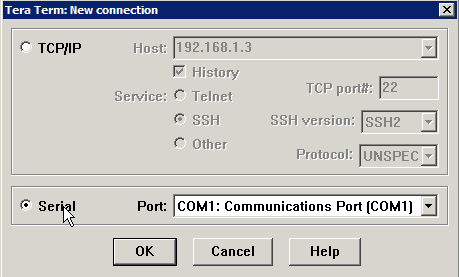
Click OK and then press Return until you see a login screen.
Check your terminal settings by clicking Setup/Serial Port. It should be set to:
Baud rate: 9600
Data: 8 bit
Parity: none
Stop: 1 bit
Flow control: none
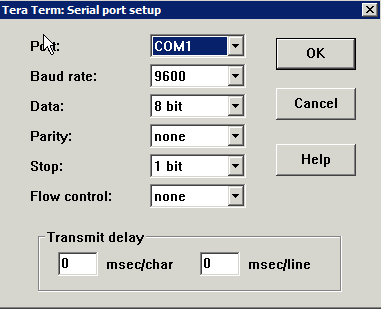
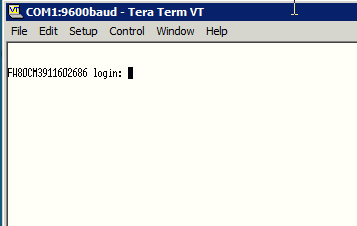
If after pressing return 2 or 3 times and you don't see the login, check your settings on Tera Term to make sure that you're connected to the right port, make sure the Fortinet device is powered on, etc. If all is correct, you'll see the login window.
Now, it's important to power cycle the Fortinet device. I wasn't able to login after many attempts because I didn't reboot it, even though I was logging in with the correct credentials. Leave Tera Term on though.
When rebooting you'll see the below in Tera Term

Login with the user name: maintainer
The password is bcpb[CAPITALIZEDSERIALNUMBER]
In my case, I logged in with password: bcpbFW80CM9999999999 (actual serial number different)
Once logged in successfully, the command to restore to factory defaults is:
exec factoryreset
The unit will reboot and you can then access via a browser (http://192.168.1.99 and login with 'admin' and an empty password).
Alternatively, you can reset the admin password by issuing the following:
config system admin
edit admin
set password
next
end
And if all is done as above, you're in to your used router!
First, you will need a serial to console cable. These are easy to come by and you'll also need a computer that has a serial connection (which is rapidly becoming hard to come by). You can use something like a Keyspan USB to serial adapter or perhaps there's a USB to console cable. Either way, I have an old Lenovo desktop with a serial connection so I used it. However, post-XP, Windows no longer includes Hyperterminal so I downloaded Tera Term VT.
Connect the serial cable between your computer and the Fortinet product, then launch Tera Term. In the New Connection window, be sure to select Serial and the appropriate port.
Click OK and then press Return until you see a login screen.
Check your terminal settings by clicking Setup/Serial Port. It should be set to:
Baud rate: 9600
Data: 8 bit
Parity: none
Stop: 1 bit
Flow control: none
If after pressing return 2 or 3 times and you don't see the login, check your settings on Tera Term to make sure that you're connected to the right port, make sure the Fortinet device is powered on, etc. If all is correct, you'll see the login window.
Now, it's important to power cycle the Fortinet device. I wasn't able to login after many attempts because I didn't reboot it, even though I was logging in with the correct credentials. Leave Tera Term on though.
When rebooting you'll see the below in Tera Term
Login with the user name: maintainer
The password is bcpb[CAPITALIZEDSERIALNUMBER]
In my case, I logged in with password: bcpbFW80CM9999999999 (actual serial number different)
Once logged in successfully, the command to restore to factory defaults is:
exec factoryreset
The unit will reboot and you can then access via a browser (http://192.168.1.99 and login with 'admin' and an empty password).
Alternatively, you can reset the admin password by issuing the following:
config system admin
edit admin
set password
next
end
And if all is done as above, you're in to your used router!
Wednesday, April 25, 2012
Article: Setting up a Multi-Subnet Infrastructure without a Router between Subnets
Setting up a Multi-Subnet Infrastructure without a Router between Subnets
http://www.petri.co.il/set-up-a-multi-subnet-infrastructure-without-a-router.htm
Setting up a Multi-Subnet Infrastructure without a Router between Subnets
by J. Peter Bruzzese - April 25, 2012
Printer Friendly Version 
Printer Friendly Version
Coauthored By: Ed Liberman
Overview
In a lab environment, you oftentimes want to mimic what you will see in a production network. The problem is that you often don't have the equipment to give you a fair mimic of the real world. This is becoming less of an issue with virtualization, because you can set up multiple VMs on a single system so long as it has the memory to handle the load you're putting upon it. Where you might come up short is if you wish to work with a multi-site environment but do not have a "true" router to work with. In this case, there is a solution that is relatively simple but requires you to have a decent grasp of subnetting.
Comprehensive Configuration & Change Management
Over 70% of network issues are caused by faulty configurations or unauthorized changes. SolarWinds Network Configuration Manager (NCM) helps you reduce or eliminate those issues by continuously monitoring device configurations and providing immediate notification of config changes so you can resolve issues before they impact users. NCM supports multi-vendor network environments with a rich web-based console providing point-and-click simplicity and easy access to config data Download a free, fully-functional 30-day trial of Network Configuration Manager - start backing up & tracking network configs in less than an hour!
There are many worthwhile reasons for learning how to do this. Two in particular that we came across was:
- to obtain a greater understanding of Active Directory sites and site replication
- to perform lab-work with something like cross-site Exchange High Availability to perform datacenter switchovers
Our Setup
You don't need to have exactly the same equipment and setup that we have here. You just need to have basically what we have in play for this to work.
FREE 3-Month Trial » Windows Azure
We're working with a single Dell T110 server running Windows Server 2008 R2 with Hyper-V. We have a single NIC that is being used by Hyper-V as a virtual switch with a virtual NIC running on the 192.168.1.x network. The IP address of the NIC is 192.168.1.20 with a subnet mask of 255.255.255.0. We have two VMs running Server 2008 R2. The default gateway is a typical 4 port switch with a WAN connection to the Internet (which they call a 'router' but it isn't a true router as we mentioned above, in the sense that it really only routes between an internal network and the Internet, not between multiple subnets).
The Goal
We would like to have both VM Servers be Domain Controllers but have them set up as different sites in Active Directory. We want it to appear as if each site is connected through a router, and still have it so that both systems can access the Internet through the default gateway.
Note: If you configure one subnet to be the same as the router, this would accomplish having that DC up and running and communicating to the Internet. However, if you go with an abstract IP network for the second server (exp. 10.1.1.x), it will not be able to communicate with the other server or the Internet.
The Method
The idea is pretty simple. We need to take the network and subnet it down to allow both systems to appear as if they are in the 192.168.1.x networks, but in reality they sit in two separate subnets. In addition, we need to make sure AD Sites and Services is configured to understand the subnet for each one.
To start with, we decided to borrow three bits from the final octet of our network/node IP configuration. We could have gotten away with only borrowing 2 bits, but that would only give us four subnets to play with and you never know when you want more.
We named our servers: DCSITE1 and DCSITE2. We gave them the subnet mask of 255.255.255.224, which indicates we are borrowing those 3 bits from the node portion and bringing it over to the network portion of the IP address.
To determine the proper host or nodes for each one, we might look at the binary involved using 3 bits from left to right (meaning using 128 | 64 | 32 ):
Bit Pattern Decimal Conversion Potential Host IP 000 0 1-30 001 32 33-62 010 64 65-94 011 96 97-126 100 128 129-158 101 160 161-190 110 192 193-222 111 224 225-254Note: Networking 101 allows us to have a network that has all 0's or 1's from a binary perspective, but not a node that has all 0's or all 1's, which is why you see potential host IPs skipping some numbers.
Based upon the potential options, we decided to give DCSITE1 an IP address of 192.168.1.33, with a subnet mask of 255.255.255.224 and a default gateway of 192.168.1.1. We pointed DNS settings back at itself and we made this system a DC and DNS server. We provided a secondary DNS on the Internet.
Now keep in mind, we are breaking some basic rules here by doing this. When you put in the default gateway and it isn't on the same network as your system, you'll even get an error (shown in Figure 1) but trust me… it will work. After all, that is the main goal here, isn't it?

Figure 1: The error message you'll see when you attempt to connect to the default gateway.
DCSITE2 was given an IP address of 192.168.1.65, which as you can see above, places this system in a different network. The subnet mask was also 255.255.255.224 and a default gateway of 192.168.1.1. In this case, we pointed the DNS settings at the first DNS server and at the Internet.
Next we opened up Active Directory Sites and Services on DCSITE1. We renamed the default first site name to SITE1 and created a second site named SITE2. We created two subnets. The first one was based off the first network and it is 192.168.1.32/27 (note: 27 indicates the number of bits we are using to accomplish the subnet). We attached that subnet to SITE1 (figure 2). We then created a second subnet as 192.168.1.64/27 and connected it to SITE2.

Figure 2: Creating new subnets and attaching them to sites.
We jumped back over to our DCSITE2 server and joined it to Active Directory, making sure to choose SITE2 in the wizard to ensure we would have both servers separate (as you can see in Figure 3).

Figure 3: AD Sites and Services showing both subnets and each DC in a different subnet
Testing
Basic network testing was going on throughout the process. We pinged from one system to the other and vice versa. We made sure we could access the Internet. Obviously, it was a good sign when the second DC was able to join the domain as a domain controller. But to test that replication was occurring properly, what we first did was go into AD Sites and Services, expand Sites, Inter-Site Transports, and select IP. From here, you can see the Replication Interval is set to the default 180 minutes (3 hours). You might not want to wait for 3 hours to see if your test is working out, so you can adjust this (and we did) to as low as 15 minutes (as shown in Figure 4).

Figure 4: The new replication interval settings are in place
Then we created a new user in SITE1 and went to have a cup of coffee. We could have forced the replication to happen, but we wanted it to happen naturally. Sure enough when we returned and refreshed the screen, the new user had been replicated over to the DC in Site 2.
Summary
None of this is rocket science, but it is a lot of little things that you need to be able to put together. For example, you need to have an understanding of subnetting, an understanding of AD Sites and Services, and basic network troubleshooting and testing. Oftentimes though, it is the simplest solutions that get overlooked when trying to come up with an alternative option to having an expensive router in your lab for a more accurate parallel to production environments.
FREE Trial » Comprehensive Virtualization Management
(via Instapaper)
Brief message sent from a handheld device.
Subscribe to:
Posts (Atom)